

gta product page over carousel
Kinguin logo

Welcome home, player!

By clicking Continue with Google or Facebook, you agree to Kinguin's Terms & Conditions and Privacy Policy, also to NFT Terms & Conditions and NFT Privacy Policy.

New to Kinguin?
Sign up now!
  • FAQ
Ashampoo COLOR #9 Key>
(0 Reviews)
Platform
Other

Ashampoo COLOR #9 Key

Sold by
keysalesnet
97.78% of 35696 ratings are superb!
Your transaction is secure
We're working hard to protect the security of your payments. We have a dedicated Fraud Prevention and Response Department working 24/7 to ensure safe transactions. We have implemented custom systems to screen out potential scammers and we have partnered with Ravelin, one of the world's best fraud prevention platforms. We don't share your payment details with third-party sellers and we don't sell your information with others.
Key activation
Languages

只需点击几下,即可获得令人惊艳的照片效果

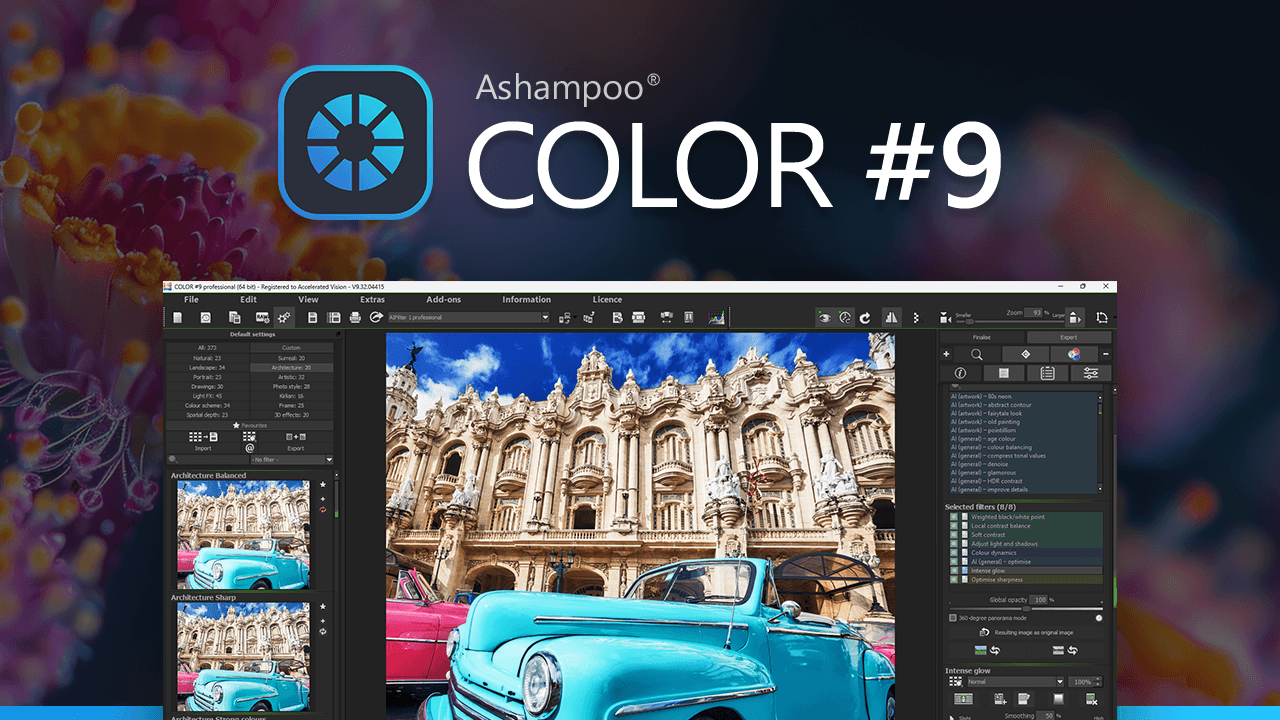
Ashampoo COLOR #9 让您的照片脱颖而出:鲜艳的色彩、动感的外观、全新的空间深度和创意十足的 3D 特效。得益于 AI 深度计算技术,该程序能够识别图像的空间结构,并呈现更自然、更具立体感和现代感的特效。只需选择预设,根据需要调整效果,即可将您的照片变成更具氛围、深度和个性的佳作。

小剧透

Ashampoo COLOR #9 以众多创意实用的新功能扩展了您的照片编辑体验。全新的 AI 深度计算功能可识别图像的空间结构,从而实现令人惊艳的空间深度和 3D 效果。28 个全新预设、扩展的空间深度预设类别以及 24 种新增的 3D 效果,只需轻点几下即可打造全新视觉效果。超过 30 种加速滤镜显著提升了编辑流畅度,而全新的水印模块、两阶段超采样、AI 蒙版选择性绘制、峰值对焦、传感器缺陷校正以及对 1382 种 RAW 格式的支持,则以更高效的方式完善了您的工作流程。

  • 利用人工智能进行深度计算,以产生更大的空间影响
  • 新增“空间深度”和“3D效果”预设类别,打造具有立体感的现代视觉效果
  • 新增“边框与渐变”图像集,采用选择性绘制技术,共包含 40 张全新背景图。
  • 28 个全新预设,只需点击几下即可快速获得结果
  • 专家模式下新增 24 种 3D 特效和 15 种通用特效
  • 超过 30 种加速滤镜,显著提升工作流程的流畅度。
  • 新增水印模块,可添加您自己的徽标或签名
  • 两阶段超采样,输出效果格外清晰
  • AI 在选择性绘图和专家模式下对前景和背景进行遮罩
  • 支持 1382 种 RAW 格式

几秒钟就能打造完美造型

Ashampoo COLOR #9 拥有 221 个图像模板,其中包括 28 个全新预设,助您快速找到适合照片的风格。无论您想要鲜艳的色彩、柔和的光影效果、胶片质感、现代风格还是创意扭曲效果,它都能立即呈现可见的效果,操作完全直观,无需任何学习成本。此外,30 多个加速滤镜也确保了更流畅的工作流程。

通过人工智能实现更深层次的理解

全新的AI深度计算功能可自动分析前景、背景和空间图像区域,从而使全新的空间深度和3D效果尤为出色。您的照片将更具立体感,更加生动逼真,无需创建复杂的蒙版。

为您的风格打造创意效果

新增的空间深度和 3D 特效预设类别,为您带来更多创作表现力图像的全新选择。此外,专家模式还提供 281 种图像滤镜、15 种全新通用特效、24 种全新 3D 特效,以及虚拟微细节和颗粒效果,打造独具个性的视觉效果。您可以快速上手,并随时根据需要进一步完善您的风格。

只编辑特定区域,而不是全部更改。

借助选择性绘图、AI前景和背景蒙版以及全新的图层混合模式,您可以精确编辑图像中的关键区域。无需更改整张照片,即可突出主体、强调细节或精确组合各种效果。

从头到尾导出干净的结果

全新的超采样技术提升了图像质量,确保了清晰的边缘和高质量的成像效果。借助新增的水印模块,您可以添加自己的徽标或水印。此外,还包含传感器缺陷校正、峰值对焦、带放大镜的对比视图以及对 1382 种 RAW 格式的支持等实用工具。

Product Rating
Write a product review and claim a 5% discount for your next purchase!
Mike
Automatic translation
I love this new version of PDF Pro! It does the same thing that Abode PDF Pro does but is cheaper! I love the new tabs feature, which allows you to work on multiple PDFs in the same window. Activation was easy—just copy and paste the key, and you are good to go! I highly recommend this software and will buy from this vendor again.
1
jean paul
Automatic translation
Super bien NP ! Super bien NP ! Super bien NP ! Super bien NP Super bien NP ! ! Super bien NP ! Super bien NP ! Super bien NP ! Super bien NP !
1
Joel
Automatic translation
I never heard before about this program, but OMG now I know tried it, this amazing tool has become my best friend. Before I relied on free web services to edit pdf but of course very bad results or not what I expected but with Ashampoo, I have the full control of the file :)
1