

gta product page over carousel
Kinguin logo

Welcome home, player!

By clicking Continue with Google or Facebook, you agree to Kinguin's Terms & Conditions and Privacy Policy, also to NFT Terms & Conditions and NFT Privacy Policy.

New to Kinguin?
Sign up now!
  • FAQ
DIKDIK Video Kit 2025 PC Steam CD Key>
(0 Reviews)
Platform
Steam

DIKDIK Video Kit 2025 PC Steam CD Key

Sold by
GAMING GATE
98.12% of 154398 ratings are superb!
Your transaction is secure
We're working hard to protect the security of your payments. We have a dedicated Fraud Prevention and Response Department working 24/7 to ensure safe transactions. We have implemented custom systems to screen out potential scammers and we have partnered with Ravelin, one of the world's best fraud prevention platforms. We don't share your payment details with third-party sellers and we don't sell your information with others.
Key activation
Languages
Release date: 17/01/2022

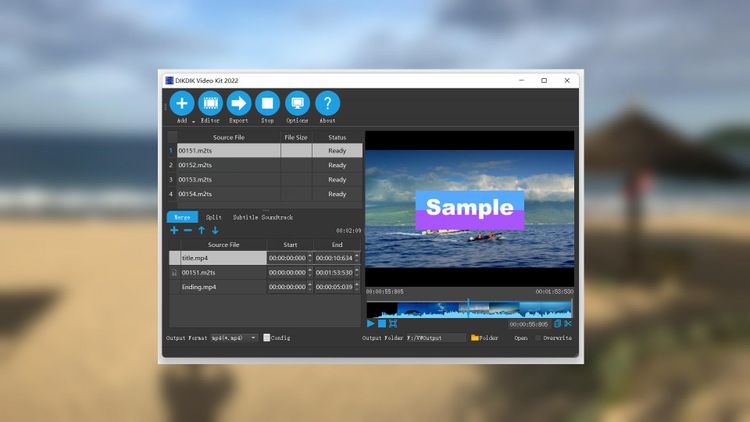
The software is an easy video creation, batch video editing, screen recording and speech to text software for editing video, screen recording, game recording, video to PDF PPT,  Auto subtitle, adding watermark and subtitle, speech to text. It can add video, audio, image, words and subtitle in WYSIWYG, and can set time of appearance, position, size and animated effects for watermark and subtitle to video, and preview at will. It can add watermark and subtitle to videos in batch, splitting and merging video in batch.

Features:

AI assistant 

1.support Ollama API for deepseek-r1 llama3.3 etc.

2.The tool supports DeepSeek-R1 for translating subtitles.

Easy Video Creation

1.Edit WordArt effects in WYSIWYG.

2.Create dynamic watermark effects (e.g. Expand, Scroll, Flash and Fade In).

3.Using the timeline, trim and split clips until you have find those perfect moments.

4.You can use it to create, modify, and save subtitles.

5.Support text to speech and speech to text.

6.Support adjust brightness, contrast, hue, saturation and volume.

Batch Video Editing

1.Support for batch video editing (merge,split,crop,watermark,subtitle,BGM etc.).

2.Support for Auto subtitle to videos.

3.Split video in batch (set number of splits,remove title sequence and ending etc.).

4.Merge video in batch (add title sequence and tail leader etc.).

5.Support video to PDF,mp4,mkv,mp3,srt etc.

Screen recording

1.Support screen recording in full screen or capture a specific area.

2.Support webcam recording.

3.Support game recording.

4.Support record your microphone audio narration and the system sound.

5. Support 120fps recording.

Product Rating