
Kinguin logo

Welcome home, player!

By clicking Continue with Google or Facebook, you agree to Kinguin's Terms & Conditions and Privacy Policy, also to NFT Terms & Conditions and NFT Privacy Policy.

New to Kinguin?
Sign up now!
  • FAQ
(0 Reviews)
Platform
Other

AnyMP4 Video Editor Key (1 Year / 1 PC)

Sold by
ITSoftware JB
98.90% of 5102 ratings are superb!
2 more offers available starting from
$11.81
Your transaction is secure
We're working hard to protect the security of your payments. We have a dedicated Fraud Prevention and Response Department working 24/7 to ensure safe transactions. We have implemented custom systems to screen out potential scammers and we have partnered with Ravelin, one of the world's best fraud prevention platforms. We don't share your payment details with third-party sellers and we don't sell your information with others.
Key activation
Languages

Create All Types of Videos for Anyone

AnyMP4 Video Editor and Maker are designed for anyone for fun, learning, marketing, and working. For example, it enables marketers to create engaging videos for invitations, intro, promotion, and more for making money on YouTube; Surely, the vlogger can make social media tutorial videos for makeup, gameplay, food, travel, training, etc., and even the educators can output the training and teaching video in minutes from its ready-made templates. As most of you, telling your stories with engaging your audience. 

Make Short Videos With Photos, Music, and Videos Instantly

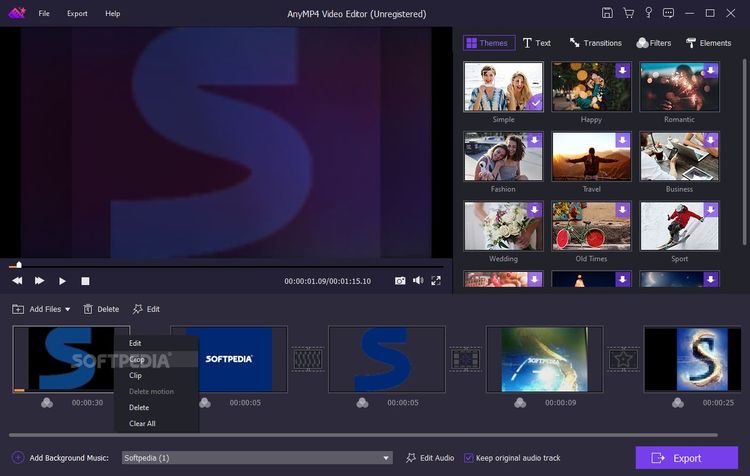
AnyMP4 Video Editor and Maker offer various templates to create a video instantly with pictures, videos, and music. It provides various ready-made templates for weddings, travel, sports, Christmas, holiday, business, and fashion to choose the best one to suit your video.

This video editor and maker lets you easily turn your digital photo albums and videos into slideshows. You don't need a degree in photography or professional help to build your slideshows shine. Moreover, it allows you to add background music that comes with each theme.

Ramp up Video With Dynamic Effects

Besides the ready-made templates, this video editor and maker also give the users more control to personalize the dynamic editing effects.

Text

Add custom dynamic text effects to the slides of your slideshow, input the words, and set font, color, position, and animation for the video transitions.

Transitions

A wide variety of transitions like a mosaic, fade, pentagram, squares, windmill, and more build smooth videos and shows much livelier.

Filters

Apply filters such as purple, stars, sketch, pixelate, gray, romantic, paints, etc., to make your movie more attractive.

Stickers

Select the stickers like leaves, emojis, hearts, shapes, snowflakes, smiles, blink, stars, dizzy, lenses, rockets, owls, etc., for a compelling video.

Edit and Customize With Your Creativity

AnyMP4 Video Maker and Editor are loaded with all the features to create impactful videos effortlessly. Even if you are a beginner, you could create Hollywood-like movies and short videos for TikTok, Facebook, Twitter, Instagram, and so on.

  • Crop video frameClip video to several segmentsRotate videoAdjust video brightness & contrastChange video saturation and hueSet video speed and volume
  • Crop video frame
  • Crop video in 16:9, 4:3 or other aspect ratio. So you can adapt video to any screen or platform such as TV, computer, smartphone, or tablet

Edit and Make 1080p HD and 4K UHD Video

AnyMP4 Video Editor supports editing 1080p HD and also 4K Ultra HD videos for more than 200 formats. It can also export 4K and 1080p HD videos, Facebook 4K/1080p HD video and other popular video formats like MP4, MOV, MKV, AVI, WMV, WebM, RMVB, MTS, M4V, FLV, TS, VOB, SWF, ASF and more.

It has the ability to export the video presentations and slideshow, which are compatible with popular devices like iPhone, iPad, Android device, etc. The exported video settings can be done directly, so that you can share on social media like TikTok, Facebook, Twitter, Instagram, YouTube, Pinterest, and so on.

4 Easy Steps to Edit and Make a Video

Step1. Click "Add photo(s) and video(s) here" to add your videos and pictures to the program.

Step2. On the right panel of the window, you are provided with basic and advanced editing tools to beautify your video.

Step3. After editing, you can add effects to your video file, such as filters, transitions, texts, and elements.

Step4. Click "Export" to choose the output format, and then click "Convert" button to start exporting your project.

Product Rating