
Kinguin logo

Welcome home, player!

By clicking Continue with Google or Facebook, you agree to Kinguin's Terms & Conditions and Privacy Policy, also to NFT Terms & Conditions and NFT Privacy Policy.

New to Kinguin?
Sign up now!
  • FAQ
This is not a product key. A NEW ACCOUNT will be created for you, and the purchased content will be available there. Log in to that account using the details provided in your Inventory. Applying any changes to the purchased account, such as adding a payment method or changing the region, may result in the account being banned. In such cases, no refund is applicable
(0 Reviews)
Platform
Steam

OVR Toolkit PC Steam Account

Sold by
GamesGuru24
98.27% of 13917 ratings are superb!
Your transaction is secure
We're working hard to protect the security of your payments. We have a dedicated Fraud Prevention and Response Department working 24/7 to ensure safe transactions. We have implemented custom systems to screen out potential scammers and we have partnered with Ravelin, one of the world's best fraud prevention platforms. We don't share your payment details with third-party sellers and we don't sell your information with others.
Key activation
notes
Languages
Recommend this game and earn$0.52or more per sold copy.Join in 3 minutes
This is NOT a product key. You will be sent A NEW STEAM ACCOUNT credentials. After checking the content on the account, change the credentials to your own as soon as possible. Not changing the email may lead to your account being banned by Steam. In such cases no refund is applicable. Please bear in mind that your account MIGHT BE LIMITED and some games are excluded from Family Sharing, therefore we don't guarantee that you will be able to share your game with your main account.
Requires a virtual reality headset!
Delivery time may take up to 2 h.
Release date: 28/06/2019

Overview

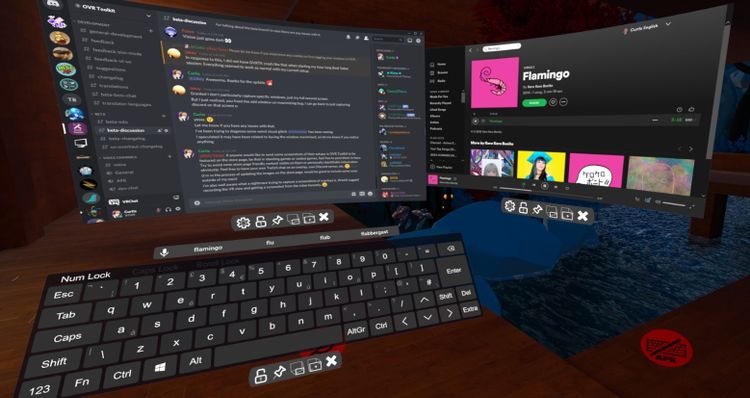
OVR Toolkit is a SteamVR Overlay utility designed to make viewing the desktop within VR easy and intuitive. OVR Toolkit allows you to display specific desktop windows, quickly select between them, use intuitive controls to navigate those windows, and use a virtual keyboard to type.

Ever wanted to reply to Discord messages without taking off your headset or looking through a nose piece? Ever wanted to pause that song you're listening to without fumbling around on your keyboard? Now you can with ease!

OVR Toolkit is compatible with all SteamVR compatible headsets. The utility is being built with the Vive/Vive Pro, Valve Index, and Oculus Rift/Rift S in mind though WMR headsets are compatible too. (Compatible controllers require a trigger and grip)

Features

  • Overlays over almost all SteamVR applications: OVR Toolkit will display on top of all your favorite titles! (VRChat, Beat Saber, mostly all SteamVR titles, etc.) 
  • Desktop window viewing: Allows you to select a desktop window and display it above your hand, or pin it in the world around you.
  • Multiple desktop windows: Create multiple different windows and place them in the world around you.
  • Attach windows to tracked devices: You can make windows move around with either your left or right controllers, headset, or have them stationary in the world.
  • Curved overlays: Improves readability of large windows in VR by wrapping them around you by a configurable amount? Now you can! (Or you can make the window into a wall by curving it to the max, I don't judge!)
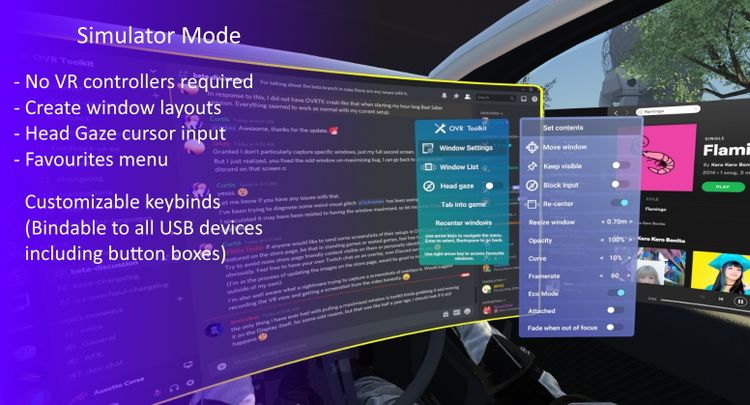
  • Window re-centering: Optionally enable window re-centering, this will make window's re-appear in front of you when you open Edit Mode. This is useful to easily pull windows to you so you can use them.
  • Quick selection of desktop windows: OVR Toolkit contains a configuration 'hotkey' menu that allows you to bind buttons on its UI to switch between specific windows in one click.
  • Intuitive desktop input: Scroll up and down on windows by dragging, make a selection by dragging, like using your finger on a phone but with a VR controller instead! (This makes a lot more sense than it sounds like it does!)
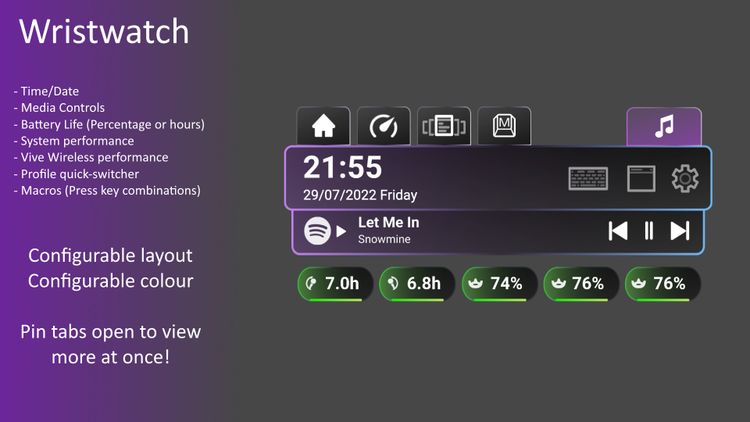
  • Wristwatch: An overlay displayed on your hand that displays the time, date, as well as Vive/Index controller/Tracker battery percentages, as well as other values such as CPU/GPU/VRAM usage.
  • Saving/Loading configurations: Like that sweet setup you've made? Well, now you can save it, and load it again next time you launch!
  • Advanced settings for window capture: Want that 60 FPS window capture experience? Want to make a window slightly transparent so it's less in the way? Want a window to disappear when you're not looking at it? Or when it's past a set distance from you? You can do these with our advanced settings!
  • Eco Mode: When enabled, performance mode will lower the capture rate of windows you are not using, this drastically increases performance and lowers CPU usage significantly!
  • Basic media controls: Spotify currently playing song will show on your wrist, along with a play/pause, skip, and previous button. (These buttons will work in other music players too)
  • Windows notifications: Display your Windows notifications in VR such as Discord messages, 'Your Phone' notifications, and anything else that would typically appear on your desktop as a push notification.
  • Macros: Create macro keybinds which can be activated by a click on the wrist to trigger a series of key presses. (Such as changing OBS scenes, muting/un-muting Discord, etc.)
  • Paste to Game: Clicking the Paste button found under the keyboard will automatically tab in the currently running game and push Ctrl and V. (Can be used to paste links into VRChat video players, paste join codes into codes, etc.)
Product Rating