


In game fest 6 overheadr Product page -overcarosel
Kinguin logo

Welcome home, player!

By clicking Continue with Google or Facebook, you agree to Kinguin's Terms & Conditions and Privacy Policy, also to NFT Terms & Conditions and NFT Privacy Policy.

New to Kinguin?
Sign up now!
  • FAQ
(0 Reviews)
Platform
Other

Ashampoo SHARPEN #5 Professional Key

Sold by
GetitCheap.pro
97.55% of 70354 ratings are superb!
Your transaction is secure
We're working hard to protect the security of your payments. We have a dedicated Fraud Prevention and Response Department working 24/7 to ensure safe transactions. We have implemented custom systems to screen out potential scammers and we have partnered with Ravelin, one of the world's best fraud prevention platforms. We don't share your payment details with third-party sellers and we don't sell your information with others.
Key activation
Languages

SHARPEN #5 — Exceptional image sharpness with artificial intelligence 

SHARPEN #5 is an image editing program developed specially to sharpen photos with extraordinary precision. It revolutionises the way you sharpen images by combining one-of-a-kind multi-directional sharpening with cutting-edge super-sampling technology.

Load your image, choose a preset and let SHARPEN #5 do the work for you. You can choose either to sit back and use the fully automatic editing feature or to adjust the sharpness of your image yourself. The program checks the specific features of each image to ensure the best results possible.

Feature list SHARPEN #5:

  • NEW: one additional quality level in multidirectional sharpening
  • Sharpness quality modes: Balanced, Pro, Pro+, Pro Infinity
  • Plug-Ins for Adobe Photoshop®/Lightroom Classic®
  • NEW: “Fill colour” module with up to eight layers
  • NEW: automatic masking of the sky and depth maps in landscape photos
  • NEW: two smart ambient light modes
  • NEW: number of composing layers increased from eight to twelve
  • Extensive RAW development module with 15 new filters and the new “Artificial intelligence” category
  • Supports LUT photo styles
  • NEW: AI filter database for using the custom AI filters you create using the new “AI Filter #1” program
  • Default sharpness settings: 45 options
  • Sharpness quality modes (Balanced, Pro, Pro+, Pro Infinity)
  • RAW development module
  • Blurring function PSF including comparison view
  • LUT style module
  • 45 Sharpness default settings
  • 7 Sharpness categories
  • Sharpness mode Luminance/Gradient
  • Batch processing
  • 33 Image templates (presets)
  • NEW: multidirectional sharpening with new mode: Artificial intelligence
  • NEW: category bar for customising the configuration of the editing areas
  • Selective processing module
  • Supports 1296 RAW camera formats
  • Multidirectional sharpening modes
  • Selective drawing module
  • Focus peaking display
  • Sharpness HD colour protection
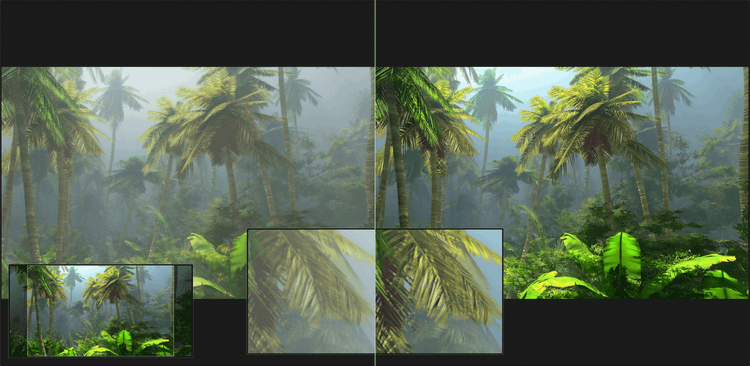
  • Comparison view with magnifying glass

Give your photos the perfect finish!

You can also edit your image with a whole range of innovative functions (such as selective drawing) to make sure you get the most out of your photos. SHARPEN #5 comes with an intuitive user interface that is easy for both beginners and professional photographers to master. SHARPEN #5 also supports a variety of RAW and standard file formats, making the program an indispensable tool in any professional image processing toolkit.

Revolutionary sharpness: Discover the revised module with super sampling and AI technology!

At the heart of the software is the redesigned sharpening module, with a new super-sampling function that ensures excellent contour smoothing in 2 quality levels. This feature is complemented by the pioneering new artificial intelligence mode for multi-directional sharpening and options for exporting and importing any of your sharpness settings.

SHARPEN #5: Perfect sharpness and more! Automatic haze correction, individual grain sharpening and over 70 area protection options for the ultimate in image editing depth!

SHARPEN #5 does not just professionally sharpen your photos; it can also perform automatic haze and fog corrections. Three quality modes to give each image its own unique feel have been added to the grain module. Extended area protection with more than 70 presets provides additional depth for your editing.

Intuitive interface in HD and Ultra HD!

The user-friendly HD and Ultra HD (4K) interface allows flexible adjustment of the main areas. Clear structure with presets on the left, current image processing in the middle and finalization options on the right. The innovative category bar enables individual program design by simply switching editing categories on and off.

Significant enhancements have been made to the selective drawing function, with some innovative new features added including automatic sky masking and the automatic creation of depth maps for landscapes. Furthermore, two new smart ambient light modes and four additional layers have been added to the composing function.

The enhanced RAW module now has four new filters and a completely new artificial intelligence category that itself includes 15 innovative filters. Some of the new additions include simulating effects such as colour ageing and moods such as sunlight, moonlight, sunset, autumn and winter colours.

SHARPEN #5 professional features a multitude of additional modules, including an LUT style module for transferring photo styles as cube or HALD files and an AI module for using artificial intelligence filters, which you can create yourself with our AI Filter #1 program.

Product Rating
Write a product review and claim a 5% discount for your next purchase!
Mike
Automatic translation
I love this new version of PDF Pro! It does the same thing that Abode PDF Pro does but is cheaper! I love the new tabs feature, which allows you to work on multiple PDFs in the same window. Activation was easy—just copy and paste the key, and you are good to go! I highly recommend this software and will buy from this vendor again.
0
jean paul
Automatic translation
Super good NP! Super good NP! Super good NP! Super good NP Super good NP! ! Super good NP! Super good NP! Super good NP! Super good NP!
0
Joel
Automatic translation
I never heard before about this program, but OMG now I know tried it, this amazing tool has become my best friend. Before I relied on free web services to edit pdf but of course very bad results or not what I expected but with Ashampoo, I have the full control of the file :)
0