

Kinguin logo

Welcome home, player!

By clicking Continue with Google or Facebook, you agree to Kinguin's Terms & Conditions and Privacy Policy, also to NFT Terms & Conditions and NFT Privacy Policy.

New to Kinguin?
Sign up now!
  • FAQ
(0 Reviews)
Platform

Gilisoft Screen Recorder CD Key

Sold by
Licenseshub
97.41% of 7466 ratings are superb!
3 more offers available starting from
$6.03

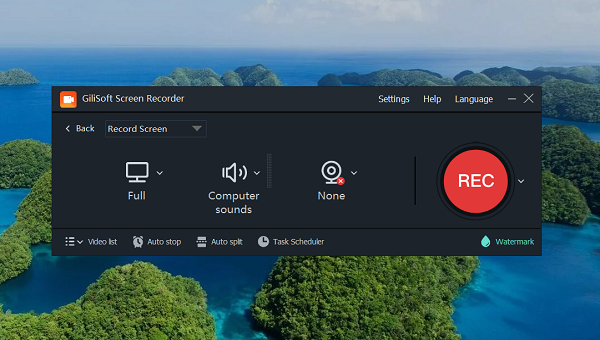
Gilisoft Screen Recorder is a screen recording software for Windows, it captures what you see on screen and what you hear/say simultaneously, and saves them as compressed video file in real-time. Instead of recording screen in a single monitor, there are times that you may want to capture screen activity on dual or multiple monitors that connected to your computer. With the screen recording software you can record webinars, games and Skype videos in HD, and much more in a quick and hassle-free way. The intuitive and easy-to-use software offers a complete suite of tools and options for professional screen capture. 

Features:

  • Record Screen and Webcam
    It can record the entire screen (support multiple monitors), single window or the area of screen your select. It also can record video from wecam or record screen and webcam at the same time.
  • Achieve High-Quality Recordings
    Recording high-quality audio and video can sometimes be NOT a challengere. With it you can create professional-like video tutorials and screencasts.
  • Recording Mic and Computer
    Screen Recorder can record video with computer sounds, record video with microphone or record screen with audio from your microphone and speakers.
  • Zoom In While Recording
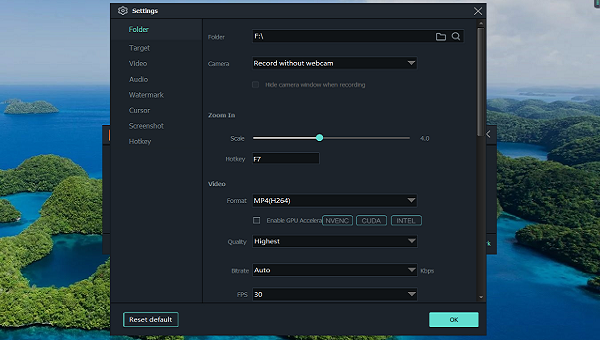
    Ever seen tutorials and impressed they are able to zoom in and out whilst recording? Screen recorder can adjust the recording area magnify the area of cursor during recording (Maximum 4X).
  • H264 GPU Acceleration Encoding
    Optimizes recording performance by using a hardware-accelerated H.264/HEVC encoder. It will allow you to record the target in high speed, with a high compression ratio and excellent quality.
  • Popular Video Output Formats
    You have a wide selection of different HD popular video formats: MP4, AVI, WMV, FLV, H264 and more. Choose the one that best fits your needs.
  • Draw on Video/Add Logo to Video
    For placing your own logo image on the video for showing who the creator is, you can record video with text watermark or image watermark. Draw on the video during the recording process. Add important drawings to your tutorials and make videos more engaging.
  • Capture Snapshots
    Screen Recorder can take desktop High Quality screenshots and save file as PNG, JPG, BMP format whether or not you start recording video.
  • Recording Schedule
    With this feature, you can set the time to start a recording, as well as the conditions (for example, time, file size, recording length) to stop a recording. It includes an advanced time triggered recording which gives you the power to schedule recording either for a website or anything that runs on your desktop to start or stop at a certain time. Using this feature, recording are made automatically on the Once, Daily and Weekly you choose.
  • Countdown Recording & Auto-Stop Recording
    Countdown recording is designed to help you prepare for your recording and provide confirmation that your recording has successfully started. What is Auto-Stop Recording? Sometimes you want to record a 1 hour webinar that already started while you go to do something else. It help you don't need to remember to turn it off manually.
  • Hot Keys
    Easily use hotkeys to start, pause ,stop recording video , capture screenshot and use hotshot function.
  • Cursor and Click Effect
    Embed mouse cursor in recording, mouse click sound effect, and mouse click effect.
Product Rating
Write a product review and claim a 5% discount for your next purchase!
Jong
Automatic translation
Download link for Gilisoft Slideshow Maker is not correct. Hope you can rectify as soon as possible. I have just purchased Slideshow maker
0
Berserker
Automatic translation
Gilisoft USB Encryption effectively protects USB data through encryption. If the stick is lost, the information remains safe. Secured with password or authentication, ideal for personal and business data. Ensures privacy and security when transporting sensitive information on USB devices
0