

Kinguin logo

Welcome home, player!

By clicking Continue with Google or Facebook, you agree to Kinguin's Terms & Conditions and Privacy Policy, also to NFT Terms & Conditions and NFT Privacy Policy.

New to Kinguin?
Sign up now!
  • FAQ
(0 Reviews)
Platform
Steam

DIKDIK Video Kit 2022 Steam CD Key

Sold by
Memory Merchant
95.51% of 7220 ratings are superb!
2 more offers available starting from
$8.86
Your transaction is secure
We're working hard to protect the security of your payments. We have a dedicated Fraud Prevention and Response Department working 24/7 to ensure safe transactions. We have implemented custom systems to screen out potential scammers and we have partnered with Ravelin, one of the world's best fraud prevention platforms. We don't share your payment details with third-party sellers and we don't sell your information with others.
Key activation
Languages
Release date: 17/01/2022

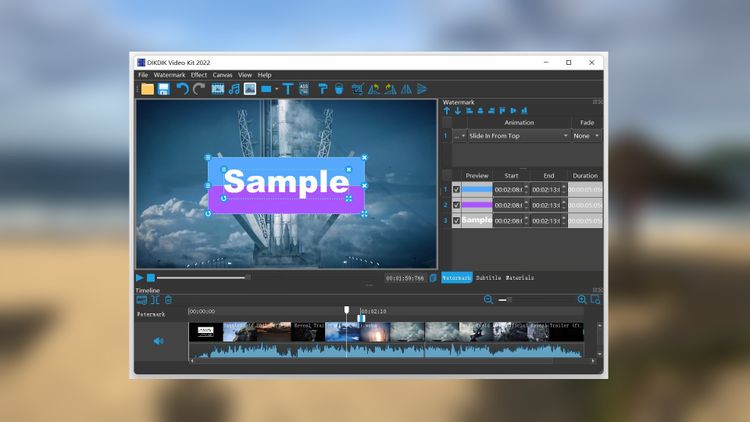
The software is an batch video editor software for editing video, adding watermark and subtitle. It can add video, audio,image, words and subtitle in WYSIWYG, and can set time of appearance, position, size and animated effects for watermark and subtitle to video, and preview at will. It can add watermark and subtitle to videos in batch, splitting and merging video in batch.

Features

Put watermarks to videos in batch
1. Edit WordArt effects in WYSIWYG.
2. Create dynamic watermark effects (e.g. Expand, Scroll, Flash and Fade In).
3. Insert coypright symbols C, R or TM to video.
4. watermarks (video,audio,pictures, text).

Add subtitles to videos in batch
1.Edit subtitle in WYSIWYG.
2.Create dynamic subtitle effects (e.g. Expand, Scroll, Flash and Fade In).
3.Add .srt or .ssa subtitles to videos.

Split video in batch
1.Set number of parts or a duration of each clip.
2.Set start and end points for every part.
3.Remove title sequence and ending.

Resize videos in batch
1.Video resizing serves the same purpose as splitting.
2.Video landscape and portrait conversion.
3.Crop videos in batch.

Merge videos in batch
1.Add title sequence to videos in batch.
2.Add tail leader to videos in batch.

Extract sounds from videos in batch
1.Add watermark to audio in batch.
2.Record sound to vidoes.
3. Convert videos to mp3
4. Merge multiple mp3 files into one.
5. Split an MP3 into multiple MP3s.

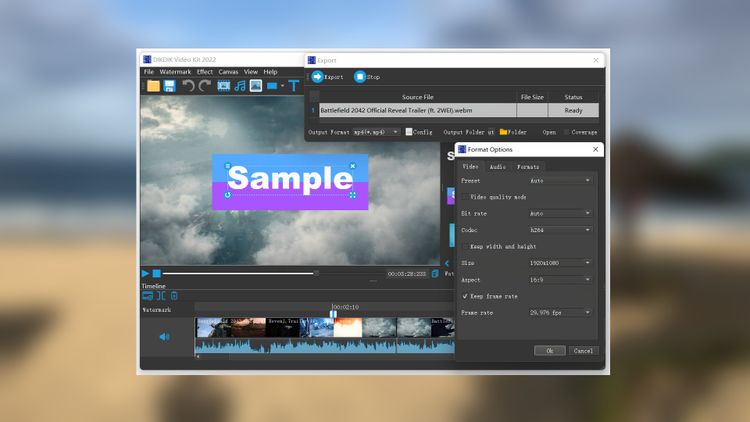
Convert videos in batch
1.Support multi-core processor and concurrent conversion of multiple files.

Product Rating